
Last updated on
Oct 31, 2026
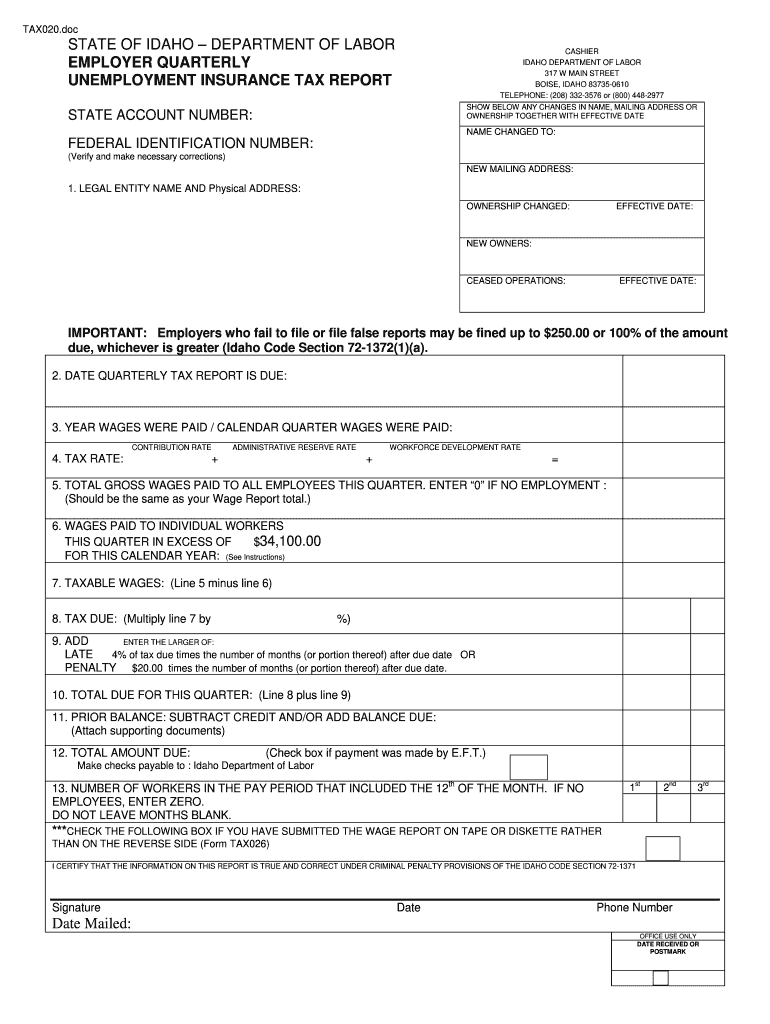
ID DOL Tax020 free printable template
pdfFiller is not affiliated with any government organization

Fill out
Complete the form online in a simple drag-and-drop editor.

eSign
Add your legally binding signature or send the form for signing.

Share
Share the form via a link, letting anyone fill it out from any device.

Export
Download, print, email, or move the form to your cloud storage.
Why pdfFiller is the best tool for your documents and forms


End-to-end document management
From editing and signing to collaboration and tracking, pdfFiller has everything you need to get your documents done quickly and efficiently.
Accessible from anywhere
pdfFiller is fully cloud-based. This means you can edit, sign, and share documents from anywhere using your computer, smartphone, or tablet.
Secure and compliant
pdfFiller lets you securely manage documents following global laws like ESIGN, CCPA, and GDPR. It's also HIPAA and SOC 2 compliant.
What is ID DOL Tax020
The Idaho Unemployment Insurance Tax Report is a state tax form used by employers to report quarterly wages and remit unemployment insurance taxes in Idaho.
pdfFiller scores top ratings on review platforms




Happy with the user-friendly design, but I think there should be additional features. Eg: Draw, shapes, add image/icon.
Allows me to assign unique page numbers in a pdf that has multiple page documents merged into one pdf
Who needs ID DOL Tax020?
Explore how professionals across industries use pdfFiller.

ID DOL Tax020 is needed by:
-
Idaho employers reporting quarterly payroll taxes
-
Businesses with employees in Idaho
-
HR professionals managing employee wages
-
Accountants or tax preparers in Idaho
-
Any entity liable for unemployment insurance in Idaho
Comprehensive Guide to ID DOL Tax020
What is the Idaho Unemployment Insurance Tax Report?
The Idaho Unemployment Insurance Tax Report is a critical document for employers in Idaho, serving the essential purpose of reporting quarterly wages and paying unemployment insurance taxes. This state tax form requires employers to provide specific information, including their legal entity name, total gross wages, and other pertinent data. Failure to submit this report can lead to penalties and affect the unemployment benefits of their employees.
Purpose and Benefits of the Idaho Unemployment Insurance Tax Report
Timely filing of the Idaho Unemployment Insurance Tax Report is paramount for employers, as it not only ensures compliance with state regulations but also allows them to avoid financial penalties. Reporting quarterly wages accurately helps maintain the integrity of the unemployment insurance system, which benefits employees and the economy. Employers can streamline their tax processes and keep their accounts in order by adhering to the filing requirements.
Key Features of the Idaho Unemployment Insurance Tax Report
The Idaho Unemployment Insurance Tax Report features several key fields that must be completed, including:
-
Legal entity name
-
Physical address
-
Total gross wages
-
Taxable wages
-
Tax due
This fillable form is designed for ease of use, allowing employers to enter information directly into various fields and sign electronically as required. The clear layout reduces the risk of errors during submission.
Who Needs the Idaho Unemployment Insurance Tax Report?
All employers operating in Idaho are required to submit the Idaho Unemployment Insurance Tax Report. This includes various types of businesses, whether they are sole proprietorships, partnerships, or corporations. Understanding their specific obligations is crucial for employers to ensure they accurately report their wages and taxes.
When and How to Submit the Idaho Unemployment Insurance Tax Report
The deadlines for submitting the Idaho Unemployment Insurance Tax Report are critical. Employers face consequences if submissions are made late, including potential penalties. There are various submission methods available:
-
Electronically through the Idaho Department of Labor website
-
Via mail, ensuring it is postmarked by the deadline
Employers should choose the method that best fits their workflow for efficient processing.
How to Fill Out the Idaho Unemployment Insurance Tax Report Online
To fill out the Idaho Unemployment Insurance Tax Report online, follow these step-by-step instructions:
-
Access the online form through the designated platform.
-
Enter required information in each field accurately.
-
Review your entries for any common mistakes.
-
Sign the document electronically.
-
Submit the form according to your preferred method.
Be sure to double-check each section, especially the totals to avoid pitfalls that could lead to complications.
Common Errors to Avoid When Completing the Idaho Unemployment Insurance Tax Report
Filing the Idaho Unemployment Insurance Tax Report comes with its challenges. Here are frequent errors to avoid:
-
Incorrect total gross wages reported
-
Misspelled business names
-
Omissions of required signatures
Ensure to validate all information before submission using a review checklist to catch these errors early.
Security and Compliance for Idaho Unemployment Insurance Tax Report
Security in handling sensitive information is paramount. pdfFiller employs 256-bit encryption and adheres to regulations such as HIPAA and GDPR to ensure the safety of data throughout its process. Understanding compliance with these laws further mitigates risks associated with handling personal and financial information.
Using pdfFiller for the Idaho Unemployment Insurance Tax Report
pdfFiller enhances the experience of filling out the Idaho Unemployment Insurance Tax Report. With features like easy editing, electronic signing, and seamless sharing capabilities, employers can complete their forms confidently. The platform ensures a user-friendly environment while maintaining high security.
Next Steps After Submitting the Idaho Unemployment Insurance Tax Report
After submitting the Idaho Unemployment Insurance Tax Report, employers should track their submission status. Confirmation processes are in place to verify receipt by the Idaho Department of Labor. If corrections or amendments are necessary, specific procedures are outlined to facilitate these changes smoothly.
How to fill out the ID DOL Tax020
-
1.To begin, visit pdfFiller and log in or create an account if you haven't done so yet.
-
2.Use the search bar to find the Idaho Unemployment Insurance Tax Report form or navigate to the tax forms section.
-
3.Once you've located the form, click on it to open in the editor interface.
-
4.Gather all necessary information such as your business's legal entity name, physical address, total gross wages, taxable wages, and tax due amounts.
-
5.Start filling in the blank fields, ensuring to accurately input your business information as required by the form.
-
6.Utilize pdfFiller's tools to check the boxes where applicable and complete required fields with precise data.
-
7.Refer to the explicit instructions provided on the form for detailed guidance on each section.
-
8.After completing all required portions of the form, review your entries carefully for any potential errors or omissions.
-
9.Use the 'Preview' option to see your entire form before finalizing it.
-
10.To save your work, click on the 'Save' button, and choose whether to download it as a PDF or submit it directly online.
-
11.Once saved, you can also share the form directly from pdfFiller or keep it for your records.

Who is eligible to file the Idaho Unemployment Insurance Tax Report?
Employers operating within Idaho that have employees subject to unemployment insurance must file this report. It applies to all entities paying wages.
What is the deadline for submitting the report?
The Idaho Unemployment Insurance Tax Report is usually due quarterly. Ensure timely receipt by the Idaho Department of Labor to avoid penalties.
How can I submit the Idaho Unemployment Insurance Tax Report?
You can submit the completed form electronically through pdfFiller or mail a printed copy directly to the Idaho Department of Labor depending on your preference.
What documents do I need to complete this form?
You will need to gather information on total gross wages, taxable wages, and your business's legal name and address before starting the form.
What are common mistakes to avoid when filling out this form?
Ensure you accurately report total gross and taxable wages and double-check the legal entity name for any typos to avoid processing delays.
How long does it take to process the Idaho Unemployment Insurance Tax Report?
Processing times can vary, but typically, submissions are processed within a few weeks by the Idaho Department of Labor. Early submission is advisable.
Is notarization required for submitting this form?
No, notarization is not required for the Idaho Unemployment Insurance Tax Report. However, it must be signed by the employer.
Related Content
Related Forms



Related Catalogs
Get the latest insights from our blog


If you believe that this page should be taken down, please follow our DMCA take down process
here
.
This form may include fields for payment information. Data entered in these fields is not covered by PCI DSS compliance.